
The Helpful Menu in the Email Footer
The bottom of each email should including something like the following:
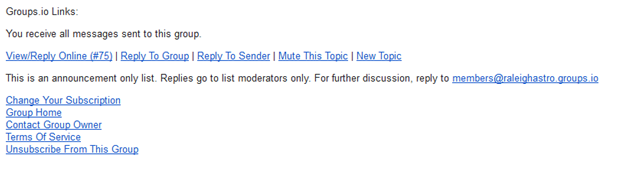
This offers a range of ways to reply to the individual message.
View/Reply Online – This will redirect you to the web interface where you can compose a reply to the email thread
Reply To Group – This starts a reply to the thread using your default email client
Reply To Sender – Send a reply to the sender of the email, directly, off-list
Mute This Topic – If you no longer want replies for the email thread, this will prevent further emails on the topic from being sent to you
New Topic – Start a new discussion!
Change Your Subscription – Changes you delivery options (e.g. daily digests, grouped digests, “no mail” or the normal immediate email
Group Home – This link takes you to the web interface where you can view message archives. There are other features here which are not being used at this time.
Contact Group Owner – For RAC, this is another way to contact your friendly webmaster(s).
Terms of Service – Groups.io has terms of service similar to any 3rd party service provider
Unsubscribe from Group – Allows you to unfollow the group. We ask you not unfollow the top level announcement group, but you can leave any other group, including the very active member discussion forum.


