
The notification bar is used to show timely information at the top of the page for members (and optionally) the general public. In order to change this, navigate to the WPFront->Notifcation Bar menu entry.

Notification Bar Menu
Te settings page contains all the field needed to configure the bar. The top part of the screen is displayed below:

Top Part of Notification Settings
In this part of the screen, you should not make edits. Just insure that the Enabled box is checked. It is also highly recommended that the Keep Closed button is not checked. Scroll down to the bottom half of the screen to see the message parameters:
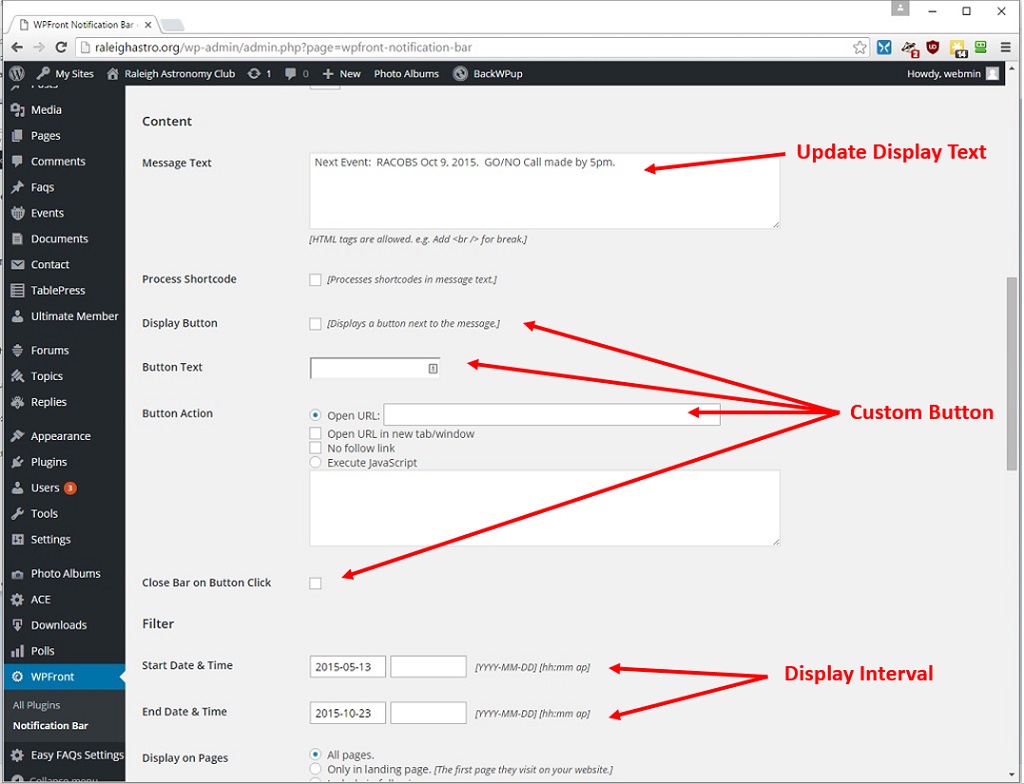
Message Paramters
You can update the message text you would like displayed in the Message Text field. You can either add onto the existing message or replace it. Please note that unlike other WordPress editors, extra carriage returns are not retained. If you wish to break to a new line, you must use an html primitive (like the break command br /, but in <>)
You can add a button with custom text as well. This button will take the user to a link specified in this setting.
You can also specify a start and end date/time to display the banner.
Remember to click Save when changes are completed.


